Lecture 11 Arrays
Joseph Haugh
University of New Mexico
Different Types of Data
- We have seen many examples of data and how to store it
- Favorite sports team: String
- Age: Int
- Pi: Double
- However, what if we wanted to store a sequence of sports teams or ages?
- This is where arrays come into play
Motivating Example: Average
- Let’s say we wanted to write code to take the average of 4 numbers:
double x1 = 13;
double x2 = 27.3;
double x3 = 32.91;
double x4 = 103.4;

double sum = x1 + x2 + x3 + x4;
double average = sum / 4;- Easy enough, but what about 10 numbers?
Motivating Example: Average
double x1 = 13;
double x2 = 27.3;
double x3 = 32.91;
double x4 = 103.4;
double x5 = 73;
double x6 = 90;
double x7 = 22;
double x8 = 4.31;
double x9 = 3.14;
double x10 = 90.45;

double sum = x1 + x2 + x3 + x4 + x5
            + x6 + x7 + x8 + x9 + x10;
double average = sum / 10;- This is quickly getting out of hand!
Motivating Example: Average
double x1 = 13;
double x2 = 27.3;
double x3 = 32.91;
double x4 = 103.4;
double x5 = 73;
double x6 = 90;
double x7 = 22;
double x8 = 4.31;
double x9 = 3.14;
double x10 = 90.45;

double sum = x1 + x2 + x3 + x4 + x5
            + x6 + x7 + x8 + x9 + x10;
double average = sum / 10;- We have several problems with this code:
- It does not scale
- We have to change the average calculation code to add more numbers
- Arrays and functions allow us to solve these problems!
- We will come back to this
Arrays
An arrays allow us to hold multiple pieces of data inside 1 variable
They are similar to lists in Python
They are 0-based meaning the index of the first element is 0
Arrays length is immutable
Creation syntax:
<<typeName>>[] <<variableName>> = new <<typeName>>[<<arraySize>>];For example:
double[] xs = new double[10];In English: create an array of doubles named
xswhich can hold 10 elements.
Motivating Example: Average
double[] xs = new double[10];

xs[0] = 13;
xs[1] = 27.3;
xs[2] = 32.91;
xs[3] = 103.4;
xs[4] = 73;
xs[5] = 90;
xs[6] = 22;
xs[7] = 4.31;
xs[8] = 3.14;
xs[9] = 90.45;

double sum = 0;
for(int i = 0; i < xs.length; i++) {
    sum += xs[i];
}
double average = sum / xs.length;- We still have to insert our values
- However, now we don’t have to change our calculation if we add more numbers
Code Explanations
double[] xs = new double[10];- Create an array of doubles named
xswhich can hold10elements
- Create an array of doubles named
xs[0] = 13;- In
xsassign index0to the value13
- In
for(int i = 0; i < xs.length; i++)- For
ifrom0to the length ofxsincrementiby 1 after - Length is the number of elements the array can hold, in this case
10
- For
sum += xs[i];- Add the value at index
iinxstosum
- Add the value at index
double average = sum / xs.length;- Divide the
sumby thelengthofxsand assign it toaverage
- Divide the
Array Declaration
- We can declare an array of any of the types we have seen so far:
// Leaves the value empty,
// you can declare it later
int[] a;
// int array of size 4
int[] b = new int[4];
// String array of size 3
String[] c = new String[3];
Array Declaration With Specific Values
- You can also initialize arrays with specific values:
// int array of length 4
int[] xs = { 5, 3, 8, 4 };
// String array of length 2
String[] strs = { "hello", "world" };- After declared you can change the individual values
- After declared you cannot change the length of the array
Example: findLargest
- Let’s write a function to find the largest value inside of a given array
- If the array is empty then return
-1 - Step 1: Write our plan
int findLargest(int[] xs) {
    // Initialize largest to -1
    // Loop over each element of the array
    // Determine if current element is the largest
    // Return the largest
}
Example: findLargest
- Step 2: Define the easy parts
int findLargest(int[] xs) {
    // Initialize largest to -1
    int largest = -1;
    // Loop over each element of the array
    for (int i = 0; i < xs.length; i++) {
        // Determine if current element is the largest
    }
    // Return the largest
    return largest;
}
Example: findLargest
- Step 3: Define hard parts
int findLargest(int[] xs) {
    // Initialize largest to -1
    int largest = -1;
    // Loop over each element of the array
    for (int i = 0; i < xs.length; i++) {
        // Determine if current element is the largest
        if (xs[i] > largest) {
            largest = xs[i];
        }
    }
    // Return the largest
    return largest;
}
Example: findLargest
- Step 4: Test
int findLargest(int[] xs) {
    // Initialize largest to -1
    int largest = -1;
    // Loop over each element of the array
    for (int i = 0; i < xs.length; i++) {
        // Determine if current element is the largest
        if (xs[i] > largest) {
            largest = xs[i];
        }
    }
    // Return the largest
    return largest;
}
void main() {
    int[] xs = { 1, 2, 3, 4, 5, 1, 2, 3, 6, 1, 1 }; // 6
    IO.println(findLargest(xs));
}
Array Pitfalls: Index Out of Bounds
- An array of length n has indices [0, n-1]
- If you try to access an element outside that range you get an runtime error: Index out of bounds
- For example:
void main() {
    // length 3, indices 0 - 2
    int[] xs = new int[3];
    xs[0] = 2;
    xs[1] = 3;
    xs[2] = 4;
    // This will cause an error
    xs[3] = 5;
}
Array Pitfalls: Immutable Length
- Once we declare an array of length n we cannot change it
- Instead we would have to create a new array
- If we want the same elements we need to copy them over
void main() {
    int len = 3;
    int[] xs = new int[len];
    for (int i = 0; i < len; i++) {
        xs[i] = i + 1;
    }
    // empty to start
    int[] ys = new int[len * 2];
    // copy over
    for (int i = 0; i < len; i++) {
        ys[i] = xs[i];
    }
    // now we have indices 3 - 5 open
}
Array Pitfalls: Assigning Arrays To Each Other
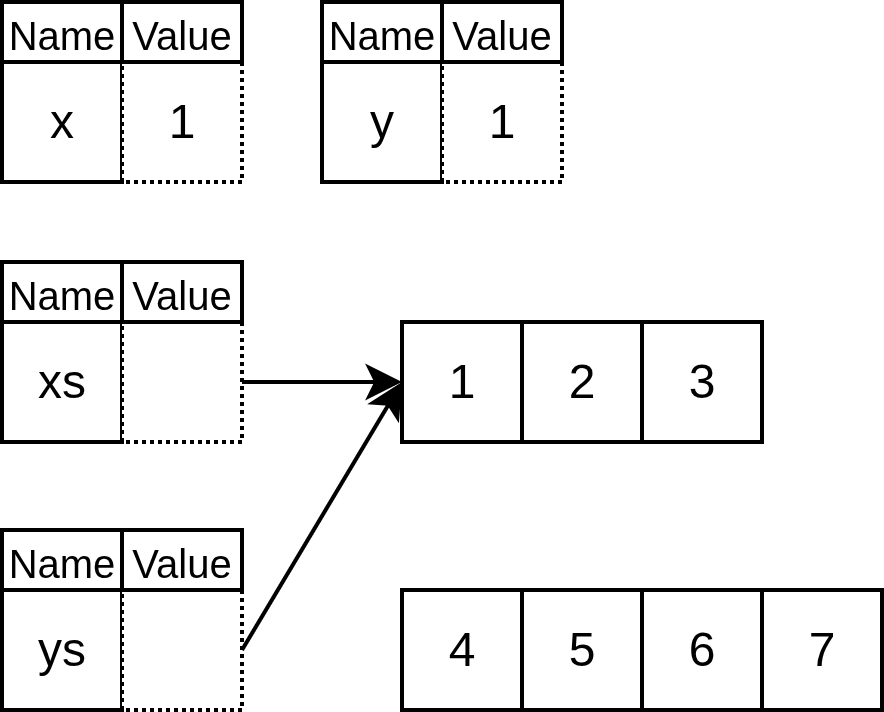
Consider the following code:
void main() {
    int[] xs = {1, 2, 3};
    int[] ys = {4, 5, 6, 7};
    ys = xs;
    // What will this print?
    IO.println(ys.length);
    // What about this?
    IO.println(ys[0]);
}- First print: 3
- Second print: 1
- Why?
Primitive vs Reference Types
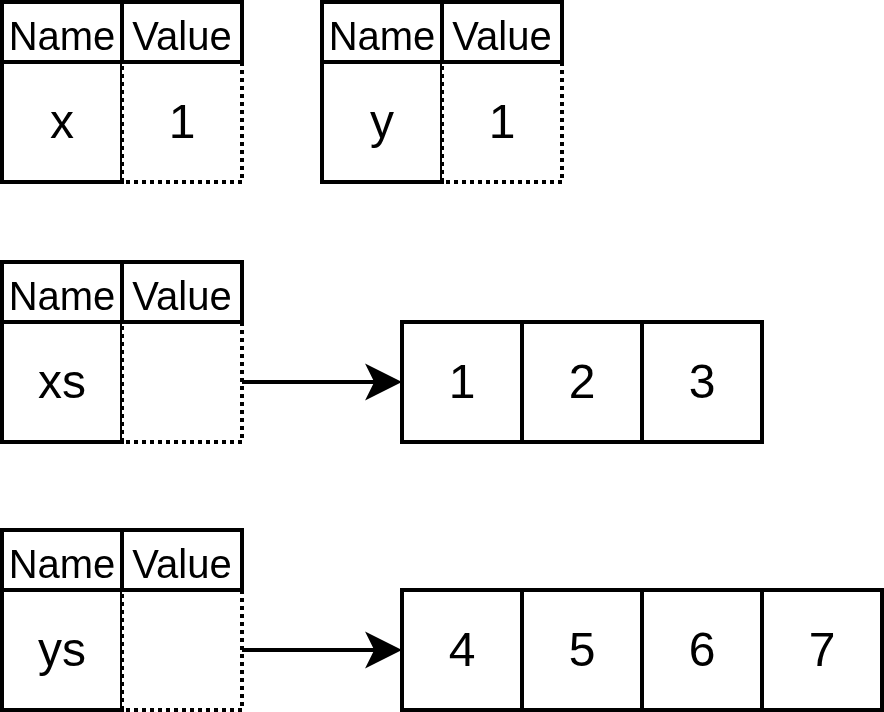
- To get to the heart of this we need to discuss a core topic we have avoided so far
- Primitive vs reference types
- We have seen examples of both
- Primitive types:
- int, float, char
- Reference types:
- String, arrays
- Primitive types:
- The core difference is:
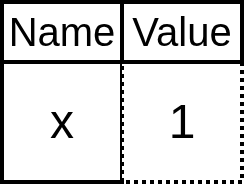
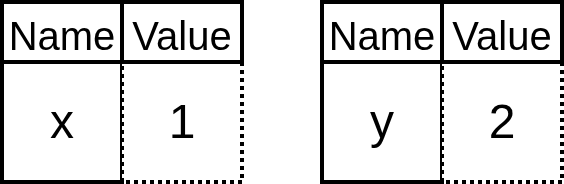
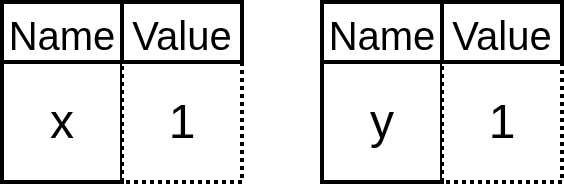
- Primitive variables store the value directly
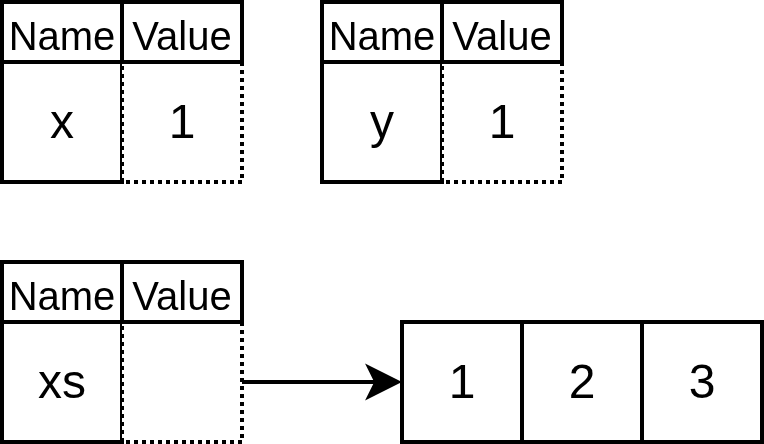
- Reference variables store a reference to the value(s)
- A reference is like an address
Primitive vs Reference Types: Analogy
- Let’s say you bought tickets to a basketball game for your friends so you could all sit together
- Now it’s time for your friends to pay up
- Your primitive friend gives you cash
- This is directly valuable to you
- Whereas your reference friend gives you their Venmo
- You have to use this information to initiate the transfer which is then valuable to you after
- Your primitive friend gives you cash
Primitive vs Reference Types
Code
int x = 1;Representation
Primitive vs Reference Types
Code
int x = 1;
int y = 2;
Representation
Primitive vs Reference Types
Code
int x = 1;
int y = 2;
y = x;
Representation
Primitive vs Reference Types
Code
int x = 1;
int y = 2;
y = x;
int[] xs = {1, 2, 3};
Representation
Primitive vs Reference Types
Code
int x = 1;
int y = 2;
y = x;
int[] xs = {1, 2, 3};
int[] ys = {4, 5, 6, 7};
Representation
Primitive vs Reference Types
Code
int x = 1;
int y = 2;
y = x;
int[] xs = {1, 2, 3};
int[] ys = {4, 5, 6, 7};
ys = xs;
Representation
Reference Type Abilities
- At first reference types may seem overly complicated
- However, they give us a new power
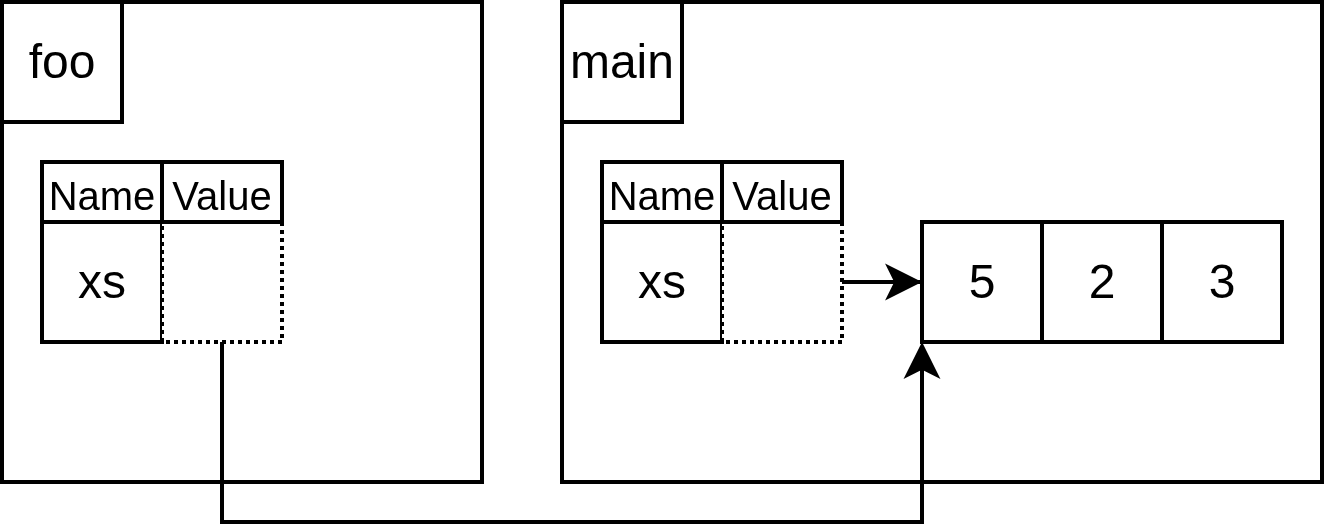
- The power to change parameters such that the changes are seen outside our function
- We could not do this with primitive types
Reference Type Abilities
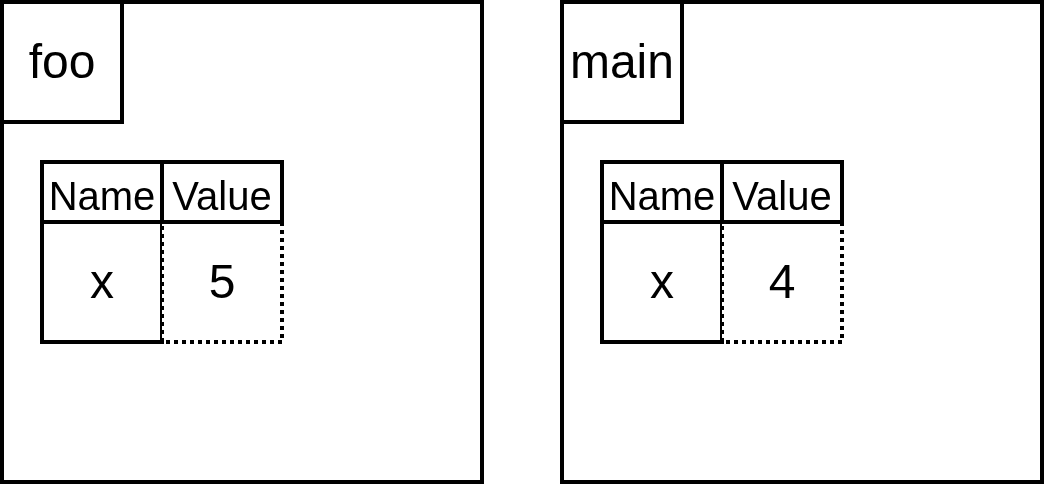
For example, what will this code print?
void foo(int x) {
    x = 5;
}

void main() {
    int x = 4;
    foo(x);
    IO.println(x);
}
Prints: 4
Reference Type Abilities
Code
void foo(int x) {
    x = 5;
}

void main() {
    int x = 4;
    foo(x);
    IO.println(x);
}
Representation
Reference Type Abilities
What will this code print?
void foo(int[] xs) {
    xs[0] = 5;
}

void main() {
    int[] xs = {1, 2, 3};
    foo(xs);
    IO.println(xs[0]);
}
Prints: 5
Reference Type Abilities
void foo(int[] xs) {
    xs[0] = 5;
}

void main() {
    int[] xs = {1, 2, 3};
    foo(xs);
    IO.println(xs[0]);
}
Representation
Example: Double All
- This ability allows us to write function such as this:
void doubleAll(int[] xs) {
    for (int i = 0; i < xs.length; i++) {
        xs[i] = xs[i] * 2;
    }
}

void main() {
    int[] xs = {1, 2, 3};
    doubleAll(xs);
    // prints something like: [I@3a71f4dd
    IO.println(xs);
}- Why does that print some weird text??
- That’s the reference or address!
Printing Arrays
Custom Printer:
String showIntArray(int[] xs) {
    if (xs.length == 0) {
        return "[]";
    }
    String s = "[" + xs[0];
    for (int i = 1; i < xs.length; i++) {
        s += ", " + xs[i];
    }
    s += "]";
    return s;
}

void main() {
    int[] xs = {1, 2, 3};
    IO.println(showIntArray(xs));
}- This only works for int arrays
- This is a problem we will solve in CS 251
- Instead use the builtin function
Arrays.toString()
Printing Arrays
Preferred way:
void main() {
    int[] xs = {1, 2, 3};
    IO.println(Arrays.toString(xs));
}
Aside: Math Functions
- Java like Python has many useful builtin math functions
- These can be accessed by doing
Math.<<functionName>> - Some of the functions available are:
Math.min(<<number1>>, <<number2>>)Math.max(<<number1>>, <<number2>>)Math.abs(<<number>>)Math.round(<<number>>)Math.sin(<<number>>)
- And many more!
Aside: Ternary Operator
The ternary operator is an if expression
Ternary syntax:
<<booleanCondition>> ? <<thenValue>> : <<elseValue>>;
Without ternary
int min(int x, int y) {
    int result;
    if (x < y) {
        result = x;
    } else {
        result = y;
    }
    return result;
}
With ternary
int min(int x, int y) {
    int result = x < y ? x : y;
    return result;
}