Lecture 18 Java Threads
Joseph Haugh
University of New Mexico
Processes and Threads
Process
- has a private, self-contained execution environment
- OS allocated memory space, processor resources
Thread
- has a private, self-contained execution environment
- a subset of the parent process’ resources
- constituent of a process
- every process consists of at least one thread
- a “lightweight process”
Threads
- A thread is a programming abstraction that allows concurrency to be implemented
- runs a single, sequential set of operations
- possesses its own call stack
- has access to shared state (among threads)
- Every process begins as a single thread of execution
- Additional threads are created to handle concurrent operations
Threads
- Threads may:
- perform different tasks in parallel
- perform different instances of the same task in parallel
- Common designs
- Threads are created by the main program to handle tasks
- thread management is handled directly by the main application
- Tasks are passed to an executor
- executor creates threads and assigns them to received tasks
- thread management is abstracted from the rest of the application
- Threads are created by the main program to handle tasks
Case Study: Auto-Save
- Consider a word processing application which retains “undo” capabilities throughout the lifetime of a document:
- documents grow very large over time
- saving large documents to disk can take several seconds
- The user wants to enable auto-save which will automatically save changes to the document while they work
Auto-Save: Sequential Design
- File writes and user interface (UI) rendering occur in the same thread
- same thread, same sequence of execution
- What will this look like?
Sequential Design: Pitfall
Since saves are time-consuming for large files, Ul updates will stop each time the document is auto-saved.

What this looks like: a “laggy” user interface
Auto-Save: Concurrent Design
- Auto-saves should be processed in a separate (worker) thread.
- in general: long jobs/tasks should occur in different threads than tasks which demand responsiveness (i.e. rendering a user interface)
- Even with threads at our disposal, in practice we should utilize an efficient data structure to store the document
- in this case: a data structure which minimizes time complexity of document saves
- food for thought: how might this data structure be designed?
Auto-Save: Concurrent Design Overview
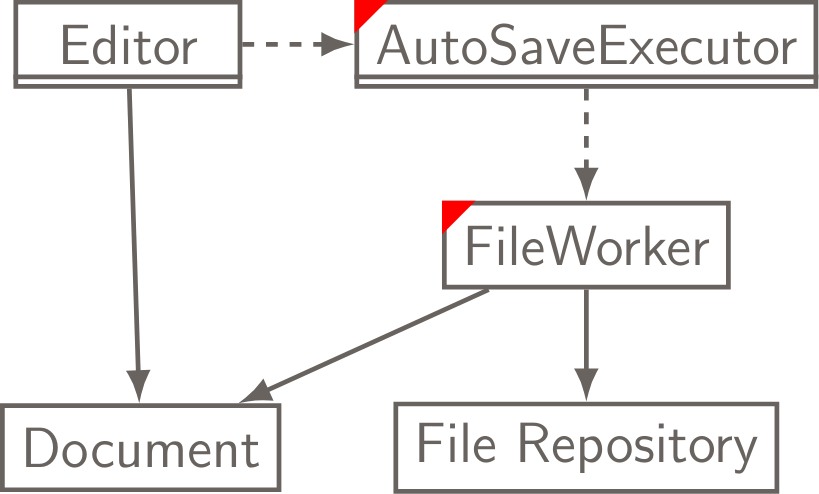
Auto-Save: Concurrent Design Overview
- Editor - the Ul and main thread
- renders and updates the user interface
- has its own thread
- Document - the shared state we want to save
- AutoSave Executor
- an executor
- manages the creation of FileWorker threads assigned to save operations
- FileWorker
- writes the current snapshot of the Document into the File Repository in a separate thread
Threads: Extending Thread
class FileWorker extends Thread {
    @Override
    public void run() {
        // save the file
    }
}

// other methods, etc.
public static void main(String[] args) {
    FileWorker worker = new FileWorker();
    worker.start();
}- We can invoke start only once during the Thread’s lifecycle
- Our code in run will be executed; the Thread terminates upon return
Threads: Implementing Runnable
class FileWorker implements Runnable {
    @Override
    public void run() {
        // save the file
    }
}

// other methods, etc.
public static void main(String[] args) {
    FileWorker worker = new FileWorker();
    Thread workerThread = new Thread(worker);
    workerThread.start();
}- Again, start can only be invoked once during the Thread’s lifecycle
- We cannot reuse Thread instances after they have returned from run
Which is preferable?
- Implementing Runnable is preferable in most cases:
- extending Thread inherits all of the overhead of the Thread superclass
- a class which implements Runnable can be further extended, while a class which extends Thread cannot
- single inheritance, which sacrifices modularity
An Aside: Inter-thread Communication
- Threads in Java can call one another’s methods (assuming they have references to one another)
- This allows:
- inter-thread communication
- polling: one thread periodically checks the state of another
Inter-thread Communication: Dominos
public class Domino extends Thread {
    private static int count = 0;
    private Domino next;
    private boolean standing = true;

    public Domino(Domino next) {
        // get/setName inherited from Thread
        setName("" + count++);
        this.next = next;
    }

    @Override
    public void run() {
        while(standing) {
        // remain standing
        }
        if (next != null) { next.topple(); }
    }

    public void topple() {
        standing = false;
        System.out.println(Thread.currentThread().getName()
            + " toppled " + getName());
    }

    // Does this always work?
    public static void main(String[] args) {
        Domino d5 = new Domino(null);
        Domino d4 = new Domino(d5);
        Domino d3 = new Domino(d4);
        Domino d2 = new Domino(d3);
        Domino d1 = new Domino(d2);
        d1.start();
        d2.start();
        d3.start();
        d4.start();
        d5.start();
        d1.topple(); // topple the first domino
    }
}
Volatile Keyword
- The above code could sometimes not work since Java’s runtime does not guarantee that changes to an ordinary variable are seen by all threads
- Runtime may do clever caching techniques to improve performance which could hide changes
- We need to explicitly tell Java that this variable is potentially accessed by different threads
- The volatile keyword does exactly that
- However, compound actions such as ++ are still not atomic for this synchronized is still needed
- Or you can use
java.util.concurrent.atomic
- Or you can use
Effective Java Item 78
Does the following code have a bug?
private static volatile int nextSerialNumber = 0;

public static int generateSerialNumber() {
    return nextSerialNumber++;
}- Yes! Since ++ is not atomic another thread could still come and read before the update
- We could synchronize as was suggested before or we could use AtomicLong
private static final AtomicLong nextSerialNumber = new AtomicLong();

public static long generateSerialNumber() {
    return nextSerialNumber.getAndIncrement();
}
Auto-Save: Implementation Overview
Beginning with basic functionality, we will incrementally implement auto-save:
- Class and method stubs
- Thread.sleep: Implementing a timed auto-save interval
- Spawning FileWorker threads to perform the save operation
- Thread.join: Pausing execution until save completion
- Thread.interrupt: Terminating threads
AutoSaveExecutor
public class AutoSaveExecutor implements Runnable {
    private int saveInterval;
    private Document document;

    public AutoSaveExecutor(int saveInterval, Document document) {
        this.saveInterval = saveInterval;
        this.document = document;
    }

    @Override
    public void run() {
        // spawn a new FileWorker every saveInterval...
    }
}
Editor
public class Editor {
    private Document curDoc = new Document();
    private Thread autoSaveThread;

    public Editor(boolean autoSaveEnabled) {
        // Instantiation of Document state...
        if(autoSaveEnabled) {
            AutoSaveExecutor autoSaveExec =
            new AutoSaveExecutor(60000, curDoc);
            autoSaveThread = new Thread(autoSaveExec);
            autoSaveThread.start();
        }
    }

    // GUI rendering, associated methods...
}
Document
public class Document {
    private Path path;

    public Path getPath() {
        return path;
    }

    @Override
    public String toString() {
        // return a String representing the Document...
    }
}- A lot of design happens here – in this example, it’s assumed our Document and all of its tracked changes are encoded as Strings
- In practice, this may not be the case
FileWorker
public class FileWorker implements Runnable {
    private final Document docToSave;

    public FileWorker(Document docToSave) {
        this.docToSave = docToSave;
    }

    @Override
    public void run() {
        try {
            BufferedWriter bufferedWriter =
            Files.newBufferedWriter(docToSave.getPath());
            bufferedWriter.write(docToSave.toString());
            bufferedWriter.close();
        } catch (IOException e) {
            e.printStackTrace();
        }
    }
}
AutoSaveExecutor: Implementing a timed save interval
- We want the AutoSaveExecutor to create FileWorker threads on a fixed interval
- Using the Thread.sleep mechanism, we can put the executor thread to sleep when it doesn’t need to be executing (i.e. spawning worker threads)
AutoSaveExecutor: Save Interval
public class AutoSaveExecutor implements Runnable {
    private int saveInterval;

    public AutoSave(int saveInterval) {
        this.saveInterval = saveInterval;
    }

    @Override
    public void run() {
        while(!Thread.interrupted()) {
            try {
                Thread.sleep(saveInterval);
            } catch (InterruptedException e) {
                e.printStackTrace();
            }
        }
    }
}
AutoSaveExecutor: Spawning FileWorkers
Now that the AutoSaveExecutor wakes on an interval, we need it to dispatch FileWorker threads to perform the actual save operation
@Override
public void run() {
    while (!Thread.interrupted()) {
        try {
            Thread.sleep(saveInterval);
            FileWorker fileWorker = new FileWorker(document);
            Thread fileWorkerThread = new Thread(fileWorker);
            fileWorkerThread.start();
        } catch (InterruptedException e) {
            e.printStackTrace();
        }
    }
}
AutoSaveExecutor: Thread.join
- Consider a scenario in which the time to complete a file write exceeds the interval at which FileWorker threads are spawned
- What happens if we accidentally spawn several FileWorkers?
- answer: memory inconsistency and errors associated with several threads attempting to write to a single file at once
- Note: in many (if not most) cases, executors are designed to work with many worker threads running concurrently
- ex: a server using a thread pool executor and worker threads to handle concurrent client requests
AutoSaveExecutor: Thread.join
The join operation waits for the active thread on which it’s called to die before proceeding
@Override
public void run() {
    while(!Thread.interrupted()) {
        try {
            Thread.sleep(saveInterval);
            FileWorker fileWorker = new FileWorker(document);
            Thread fileWorkerThread = new Thread(fileWorker);
            fileWorkerThread.start();
            fileWorkerThread.join();
            System.out.println ("Write completed at "
                + System.currentTimeMillis() );
        } catch (InterruptedException e) {
            e.printStackTrace();
        }
    }
}
Editor: Thread.interrupt
If our user wants to quit, we need to halt or interrupt the AutoSaveExecutor thread and join after the interrupt is processed
public void disableAutoSave() {
    autoSaveThread.interrupt();
    try {
        autoSaveThread.join();
    } catch (InterruptedException e) {
        e.printStackTrace();
    }
}