Instructor:
Joel Castellanos
Department of Computer Science
Course Description
This is an introductory Java programming course that moves at an accelerated pace covering the material in both CS-152L (Computer Programming Fundamentals) and CS-251L (Intermediate Java Programming) in 5 credits in one semester. The breath of the course is similar to CS-152L and CS-251L, but the depth of the programming projects requires more problem solving skills and creativity.
Week 1
- Notes: Introduction to CS-259
- Notes: Chapter 1 and "Hello World" using the IntelliJ IDE.
- Lab: Lab 1: Compute Change
- Notes: Java Primitive Types and Expressions.
Week 2
- Notes: Control Flow with if, else if and else Statements
- Src: ExtractNumber.java
Week 3
- Notes: While Loops
- Src: PrimeFactors.java This is the code we developed in class on Sept 9. As is, for many cases it correctly outputs all the prime factors for many different input numbers. However, there are some
input integers for which this does not give the correct output. Find the bug.
Week 4
- Notes: For Loops
- Lab: Code Cracker Game
- Notes: Class and Method Definitions
Week 5
- Src: CryptoGame.java Some hints
developed in class for the Crypto Game Project. Includes String methods, .toLowerCase(), .trim() and method code for removeRepeatedCharacters().
Note: the assert statements are ignored unless you add the VM option:
-enableassertions (Run... - edit Configuration - Configuration - VM Options)
- Src: ReadTextFile.java
Example text file reader using Swing for error messages.
- Src: ReadTextFileFX.java
Example text file reader using JavaFX.
Week 6
- Notes: Arrays
- Src: SimpleTextInputFX.java JavaFX example with text input field. Developed and presented by Truman DeYoung on Oct 3.
Developed and presented by Ben Matthews on Oct 2.
- Src: SimpleTextInputFX_WithSyntexChecking.java
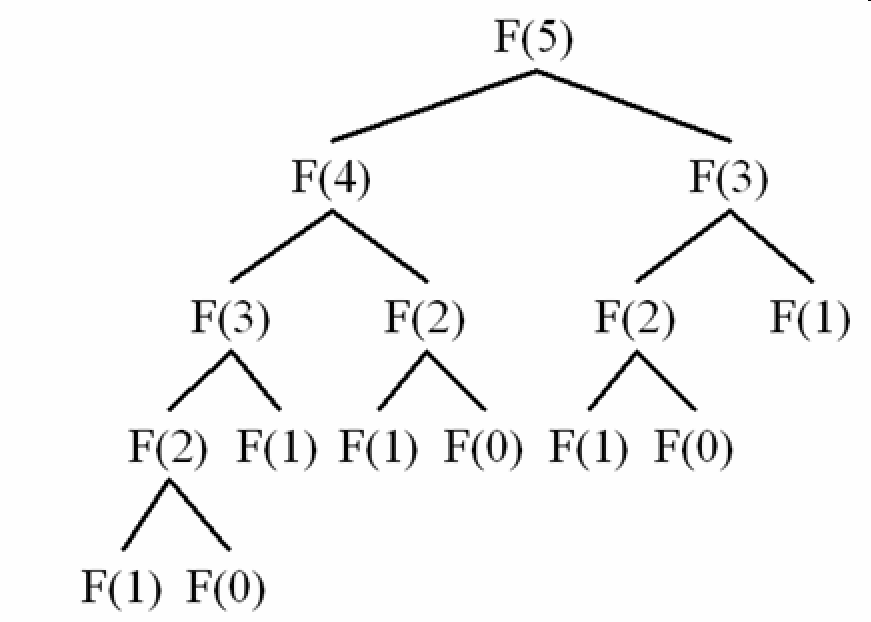
- Image: Illustration of recursive Fibonacci calls Presented by Truman DeYoung on Oct 3.
- Src: Fib.java Fibonacci series using Naive Recursion. Developed and presented by Truman DeYoung on Oct 3.
- Src: MemFib.java Fibonacci series using Recursion and memoization. Developed and presented by Truman DeYoung on Oct 3.
Week 9
- Src: SimpleTextInputFX_TwoSceneSwitching.java
Week 10
- Src: JoelCastellanosAnimations/MainFrame.java This program is split into
two classes both in the same package. MainFrame.java has the entry point, main(). It creates a JavaFX window, adds
some buttons and a draw area (the canvas).
- Src: JoelCastellanosAnimations/LineDrawAnimation.java
This class controls the drawing that happens within the canvas on MainFrame.
- Src: JoelCastellanosAnimations/BouncingLine.java
This class controls the drawing that happens within the canvas on MainFrame.
Week 11
- Src: JoelCastellanosAnimations2/MainFrame.java This is a mod of
the version in week 10 that uses inheritance of an abstract class called Animation to make sure that only one instance of
the timer is running at a time.
- Src: JoelCastellanosAnimations2/Animation.java The new abstract
Animation class which is now extended by the three drawing classes: LineDrawAnimation, BouncingLine, and
BouncingSetsOfLines.
- Src: JoelCastellanosAnimations2/LineDrawAnimation.java
Same as week 10 version except now extends Animation.
- Src: JoelCastellanosAnimations2/BouncingLine.java
Same as week 10 version except now extends Animation.
- Src: JoelCastellanosAnimations2/BouncingSetsOfLines.java
This is a new class that uses inner classes and arrays to draw 3 sets of lines each set of a different color and each
bouncing around independantly from the other sets.
- Src: JoelCastellanosAnimations2/SquareSprial.java.
- Src: JoelCastellanosAnimations2/RandomWalk.java.
- Src: JoelCastellanosAnimations2/Fireworks.java.
- Notes: Diffusion-Limited Aggregation
- Src: Print2DGridAndParticles.java This is a small stand-alone program that creates a small
2D grid array and a list of 3 points. Then prints the array and points to the console. This type of thing is very useful for debugging the DLA project.
Past Exams
Fall 2015 Midterm exam